

OFFICESPACE PRODUCT UPDATES | SEPTEMBER 2026
Better workplaces, less manual work
Delivering a better workplace experience takes a lot of work behind the scenes. The latest OfficeSpace updates put more of it in your team’s hands, with fewer handoffs, delays, and disconnected tools.

From decision to action in one platform
Make a change and see it live the same day. Discover the latest updates from OfficeSpace that make it easier to book, plan, update, and manage requests, all in one place.

OFFICESPACE STUDIO
Floor plan updates, now in your hands
Go from file import to a live, bookable floor plan without leaving OfficeSpace
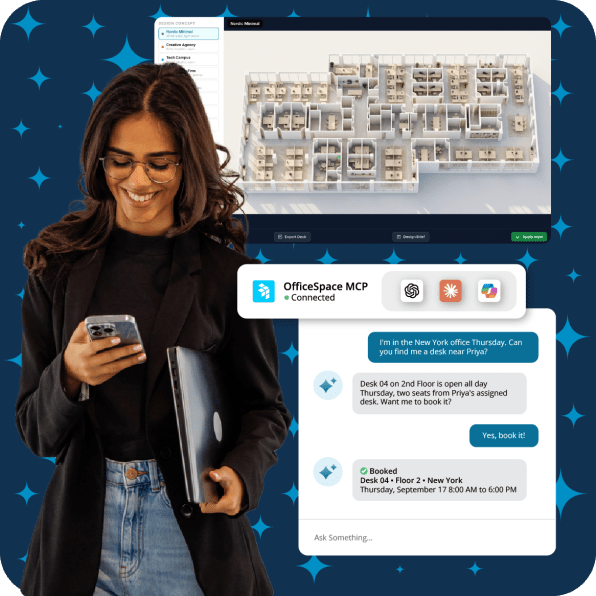
OfficeSpace Studio lets you make edits to the floor plan from your existing CAD, PDF, or image files. Import, make changes, and publish updated plans in a few clicks.
- Preserve layers from imported CAD files
- Move walls, add desks, and reconfigure furniture
- Walk the floor with 3D renderings
- Connect plans to occupancy, utilization, and capacity data
Keep routine updates in-house, shorten turnaround times, and maintain a clear version history as plans evolve.
AI DESK & ROOM BOOKING
Find and book space with a simple request.
Book the right space in your own words
Our new OfficeSpace MCP simplifies key workplace operations and allows you to work in the tech stack that's best for you. Make a natural-language request such as, “Find me a desk near Jordan on Wednesday,” in OfficeSpace or an approved AI assistant such as Claude, ChatGPT, or Copilot. OfficeSpace checks live availability, completes the booking, and confirms the space, floor, date, and time.
- Include the date, space type, and seating preferences in one prompt
- Book for one or more days at once
- Complete bookings in the AI tool you already use
Employees get a faster, more intuitive booking experience, while every reservation is captured in OfficeSpace for a clearer view of workplace demand.

RECURRING REQUESTS
Automate routine requests
Put recurring workplace requests on autopilot
OfficeSpace automatically creates recurring tickets and adds them to your existing queue, so routine work no longer depends on spreadsheets, calendar reminders, or someone’s memory.
- Schedule requests to repeat on any cadence: daily, weekly, monthly, or annually
- Keep existing assignment and SLA rules in place
- Track the status and history of every occurrence
- Pause recurring schedules without deleting the setup
Routine work stays on track with fewer manual steps, reminders, or follow-ups.
AI CANVAS | SPACE PLANNING BLOCK VIEW
Review your plan at a glance or seat by seat
See seat and people counts for every block in AI Canvas
Block View groups seats into labeled blocks and displays the seat and people counts for each one. Planners can quickly review allocations and available capacity, then switch to Seat View when they want to see individual seats.
- See seat and people counts by block
- Review allocations across floors
- Identify available capacity
- Toggle between Block View and Seat View
Understand how space is allocated at a glance.
THE BUSINESS IMPACT
Less work behind every workplace decision
These updates do more than save clicks. They give workplace teams time back, keep data current, and help CRE leaders move from question to action faster.
Capture more complete booking and utilization data
Make booking easier for employees so more activity is captured and workplace decisions reflect how space is truly used.
Reduce repeat work and disconnected processes
Automate routine tasks and connect workplace workflows in one platform, with fewer spreadsheets, handoffs, and point tools.
Give workplace teams more time for strategic work
Spend less time on bookings, tickets, data entry, and plan updates—and more time improving the workplace and portfolio.
Apply AI within existing roles and site permissions
Use AI within the access controls already set in OfficeSpace, so each person can only see and do what their role allows.

The trusted all-in-one solution for modern workplace management.
Read what users say on G2 — the world's most trusted software marketplace.

113,000,000+
Square Feet Managed
50
Net Promoter Score
4.8 / 5
Stars on G2 - User Rated
35 days
Average Implementation
SEE WHAT'S NEW
Ready to simplify how your workplace runs?
See how OfficeSpace connects your people, spaces, and operations while removing the manual work slowing your team down.
Book a demo
AI talk, with our team
With extensive backgrounds in Artificial Intelligence and app creation, our product leaders weigh in on what's important to understand about AI.

OfficeSpace provides the leading AI operating system for the built world, that helps teams plan smart spaces, coordinate in-office days, and make smarter real estate decisions faster.
© 2026 OfficeSpace Software Inc.