

Desk Booking
Easiest way to book a desk
Make every desk easy to find and worth the commute with flexible, user-friendly desk booking that removes the guesswork around workplace attendance.
Get started with OfficeSpace in 35 days.


Powered by AI Canvas
The Workplace Experience Agent suggests in-office days, recommends desks, and sends timely nudges so employees book before the good spots are gone.
The right desk, before they have to ask.
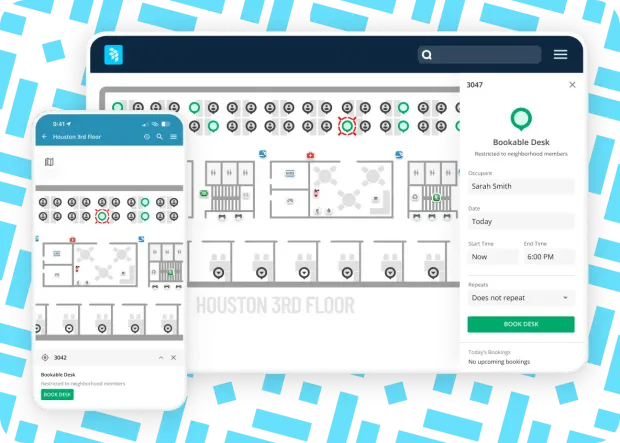
Book desks from anywhere and automatically check in upon arrival. Find a spot near friends, filter desks by amenities, navigate with interactive floor plans, and set recurring bookings.
Track attendance and desk utilization in real time, view booking trends, visualize space use with heat maps, and spot patterns to improve attendance, layouts, and ROI.
Enable hot desking, hoteling, assigned seating, or reverse hoteling to maximize space, with one flexible platform that works however your team does.
OfficeSpace powers workplace excellence for 2,000+ teams globally


Manage shared or assigned desks
Connect OfficeSpace to badges, cameras, infrared, or desk-light sensors to release desks automatically if no one checks in, freeing up more space for employees.
See when desks are occupied, reserved, or free with color-coded indicators on the floor plan, updated every few seconds.
Search for a bookable workspace by name, team, neighborhood, location, and more, then complete your hot desk booking in seconds. Restrict concurrent bookings to maximize seat use.
Make reservations in advance, set recurring bookings daily or weekly, and set auto-cancel rules to release desks if users miss check-in during their assigned time.
Make assigned and bookable desks available for "reverse hoteling" or desk lending, with rules that return a desk to the desk bank after a designated time for increased seating capacity.
Create delegates who can book on behalf of users and visitors with defined user permissions and neighborhood types in a desk booking system for employees and guests.
Book desks from anywhere with your favorite tools
Already working in Claude, ChatGPT, or Copilot? Tell your AI assistant when you need a desk and who you want to sit near. OfficeSpace finds an available space, books it, and confirms the details without making you switch tools.
Get recommended days, desks, and booking reminders with the Workplace Experience Agent. Learn more.
Automatically check in when you sit at your desk with badge and sensor integrations, or check into your reserved desks when you arrive on site with badge or WiFi.
If your desk sensor knows who you are (Embrava lights or badge), it books the seat for you automatically; if it only knows someone’s there (ceiling sensor), it still marks the desk as occupied so nobody takes your spot.
Access the Employee Homepage to see who's in and what's happening at the office, then book your desk in one tap.
Book through Microsoft Teams, 365, Google, and Slack and get automatic booking notifications and reminders through Google Calendar and Microsoft 365.
Connect OfficeSpace to your SSO, Okta, and other systems for ease of use and security.
Use kiosks and digital signs to display your digital floor plans so employees can easily find desks and seating areas on site.
Support flexible workplace seating
Facility managers can create “neighborhoods” or flexible workspace zones by team, department, project, or role, nominate “Neighborhood Captains” for easy management, and sync user permissions from Active Directory to govern booking permissions.
Give designated teams first access to reserve desks before bookings open to everyone else with advanced booking windows by department, title, or custom employee attributes. No manual holds or blanket desk restrictions.
Find desks and colleagues on the floor plan with easy wayfinding to guide you to your space.
Create neighborhoods that support intentional work by activity or work style to maximize productivity, whether it’s “me time” or “we time.”
Make any desk or workspace bookable and set booking rules globally or by site, including release times, so every desk gets used.
Get desk management reporting
Get real-time utilization and occupancy insights from any presence source to right-size your footprint and power AI forecasting.
Predict future needs with reservation status reports, including upcoming, active, or canceled reservations.
Understand desk booking trends, forecast occupancy, and optimize seating plans by top desk type, location, configuration, neighborhood, and more.
Understand utilization data with real-time workplace intelligence dashboards powered by badge and WiFi data sources, plus floor plan heat maps to track attendance trends.
Key features for desk booking software
INTEGRATIONS
Integrated out of the box
OfficeSpace comes fully integrated with Microsoft, Google, Slack, and Zoom. Fewer tools, faster work.

TAKE A TOUR
See desk booking in action
Take a self-guided tour to see how to book desks from a mobile app in seconds.

Room booking
Reduce conference room conflicts with real-time availability and notifications.
Insights hub
Access digestible reports and detailed metrics to accelerate decision-making and demonstrate impact.
Mobile app
Access every critical OfficeSpace feature on an intuitive mobile interface for untethered workspace management.
Facility requests
Tackle requests in order of priority and share progress with teams to easily maintain spaces.
CONTACT US
Ready to transform your office experience?
OfficeSpace helps companies save costs, connect teams, and optimize spaces with fast implementation and industry-leading client support.
35 Day
Implementations
SOC-2
AICPA Certified
Book a demo
REVIEWS
Real talk from real users.
Read what other clients are saying on G2—the world's most trusted software marketplace.

FAQ
Questions? We're here to help.
Browse desk booking FAQs. Don't see what you're looking for? Contact us.
Desk booking, hot desking, and desk hoteling are strategic practices in space management that support flexible work arrangements and optimize office space use, particularly in hybrid workplaces. If you are weighing options, see how OfficeSpace compares to Kadence on desk booking.
Desk booking software is one key feature of a workplace management system. It helps organizations to manage desk booking and space allocation, especially in offices with flexible seating arrangements or hybrid work models. Employees can book desks or spaces in advance or on-the-go through integrated apps, on mobile, or on a desktop.
Desk booking software optimizes space utilization by allowing employees to reserve desks as needed, ensuring efficient use of office space. This flexibility empowers employees to choose their workspace based on their preferences and needs, fostering collaboration and improving the employee experience. Additionally, desk booking software streamlines administrative processes, providing real-time insights into workspace utilization trends and supporting hybrid work models by accommodating flexible work arrangements.
Organizations struggling with underutilization of space benefit from having software to manage desk booking. The software also provides flexibility in seating arrangements, common in hybrid work models. It can also benefit companies that are looking to right-size their real estate investment and save costs. Often, when a company shifts to hybrid, they need a desk booking solution to make the shift easy for employees to use and efficient for the facility management team to track and plan the space.
All employees will interact with the software. Facilities managers, IT, and HR team members will be a part of the team implementing the software. Once implemented, all employees can have access to the tool to book desks directly on the app or web or through integrations with existing systems like Microsoft Teams, Slack, Google, and more.
Desk sharing, including hot desking and hoteling, supports flexible working styles and helps facilities managers and space planners get more use out of workspaces. You can create “neighborhoods” at the office and designate spaces for teams or activities like focus work or quiet zones without assigning a specific desk to each employee, and limit those bookings to certain teams or groups. With hot desking, you can restrict concurrent bookings to ensure certain desks remain floating desks. For hoteling, employees can set up recurring reservations. With a workplace management software like OfficeSpace, it’s easy to manage all types of desk booking as you’ll have access to an overview of the floor plan in every office. You can approve seating requests or change which desks are bookable to get the most use out of your spaces.
You can book a desk for yourself or someone else on the OfficeSpace mobile app or on a desktop. You can book a seat using the visual directory to see and select available desks, represented by a green icon, or go to Book a Desk on the platform and search for available desks based on your criteria, like date, time, and amenities. On Slack and Microsoft Teams, use slash commands to access the desk booking module and search for available desks. Admins with local and global permissions can book desks for visitors in the Visitor Management settings, which connects OfficeSpace with Greetly.
An ideal desk booking software is intuitive and easy to navigate, letting employees make reservations on-site or on-the-go, set up recurring reservations, and find desks that match their working style and preferences. Software like OfficeSpace offers mobile accessibility, integrates with tools like Slack and Microsoft Teams, has built-in features like wayfinding and digital floor plans, provides insight into booking trends, and allows admins to make instant changes as the team evolves.
Workplace management solution for the built environment

Room Booking
Find a room. Walk in. Get to work. Cut down on empty space and scheduling conflicts with automatic check-in, release, and real-time room status—no taps, no friction.

Facility Requests
Eliminate disorganized facility requests and slow response times. With OfficeSpace’s configurable request manager, teams can create, approve, and manage facility tickets in seconds.
Reporting & Analytics
Unpredictable attendance and vacant spaces? Access critical metrics to see what’s happening across your spaces in real-time and make informed decisions.
Employee Homepage
Plan your week, book your seat, and find your people all in one homepage—before you get to the office.
Ready for dynamite desk booking?
See how desk booking and other intuitive features can help transform your hybrid strategy. Connect with a member of our team or take a self-guided tour of the OfficeSpace platform.