

Hybrid Work Solutions
Keep hybrid teams connected
Coordinate hybrid schedules, keep everyone in the loop, and make days at the office worth showing up for. Get up and running in 35 days or less.
OfficeSpace powers workplace excellence for 2,000+ teams globally


“OfficeSpace has helped us successfully utilize hybrid workstations which has cut down the need for assigned desks for every employee. Booking and check-in are easy and can be done from your phone or computer. The office maps are easy to read and allow employees to search for people, rooms, and objects like printers, fire extinguishers, etc.”
Tiffany E.
Systems Administrator
User-friendly tools for better connections
Boost collaboration and make innovation possible no matter who’s working where. More freedom, less friction.
Know where to find the people you collaborate with most and locate amenities that are critical to a productive workday with an interactive visual directory and wayfinding tools.
Eliminate meeting room conflicts with real-time availability, designate spaces for hot desking and hoteling, and get smart desk booking suggestions based on previous reservations and preferences.
Accelerate user adoption with a mobile app that has feature parity with the desktop platform and full integrations with Slack and Microsoft Teams.
Use data from WiFi, badge, and desk-booking sources to replace manual check-ins and reduce employee friction.
Actionable insights from every corner of the workplace
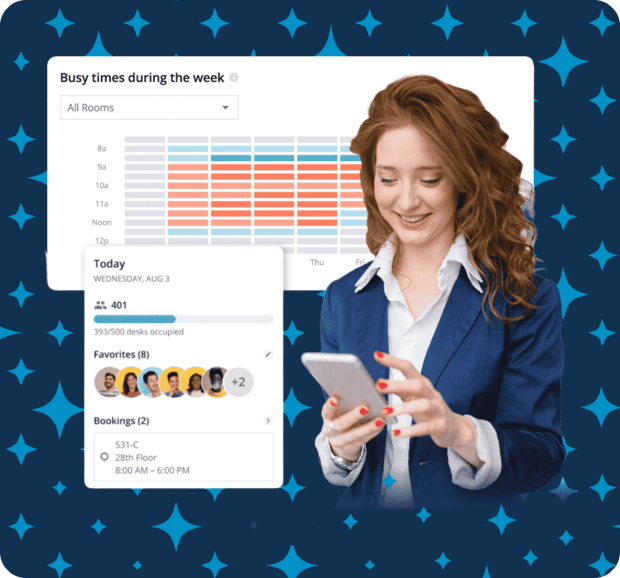
Seamlessly capture attendance, booking, and utilization data to visualize trends and forecast future needs so you can make cost-effective space and real estate decisions.
Streamline facility management and keep employees happy with up-to-the-minute insights on amenity usage and occupancy.
Access easy-to-interpret visuals that illuminate utilization and attendance trends across the portfolio so you can make real estate decisions at a glance, without the help of an analyst.
Visualize office layouts by department, test and collaborate on seating scenarios, and streamline moves, adds, and changes with drag-and-drop space planning tools.
"I love the analytics, data, and reporting that OfficeSpace provides to help me better understand my population."
Verified User
Asset Manager, Commercial Real Estate
“It was super easy to use. Way better than going to that granular level of adding every person to your email chain.”
Facilities Specialist
Workplace communication that lands
Send timely, targeted messages with Workplace Announcements to keep everyone in the loop (without getting tuned out).
Don't rely on mass communication that gets ignored. Filter recipients down to the neighborhood so your message reaches only those who need to know.
Get the word out about in-office events or scheduled maintenance before employees get to the office so they can plan their week accordingly.
Share critical announcements with employees and visitors currently on site based on desk bookings and presence data.
Forget copying and pasting to different platforms. Just hit 'send' to push your message to email, mobile app, and the OfficeSpace platform.
Tools for hybrid teams to work their way
Everything you need to create effective hybrid work solutions.
Unlike:
Outdated tools with steep learning curves and disconnected modules with poor customer support
Point solutions that only address one aspect of hybrid work, rather than the entire workplace experience
Complex platforms that require lengthy onboarding and slow time to value
OfficeSpace solutions help hybrid teams get up and running quickly (35 days on average), seamlessly plan in-office days together, stay productive and connected at the office, and reduce tension between organizations and employees to boost business impact.
With the right technology to manage hybrid work, employee satisfaction and retention improve, cost savings increase, and teams have data to make workplace decisions and drive results.
REVIEWS
Your success is our success.
Read what users have to say on G2—the world's most trusted software marketplace.

RESOURCES
Insight from industry experts


FAQ
Questions? We're here to help.
Browse hybrid work FAQs. Don't see what you're looking for? Contact us.
Collaboration is critical for innovation and moving projects forward, and distributed teams need up-to-date solutions to work together effectively. With hybrid work software, teams can coordinate their in-office days, and distributed teams can find meeting rooms to connect whether they’re in-person or remote.
Hybrid work combines working in an office with working from home or remotely. Organizations that support hybrid work allow flexibility for employees to work from anywhere at certain times, while also providing a physical office space for when teams want to connect in-person.
Hybrid work models will look different for every organization. The key to creating an effective hybrid workplace is providing an in-office experience that fosters productivity, optimizes workspaces while reducing costs, and supports distributed teams by enabling collaboration. The best way to create a hybrid work model that works for your organization is to capture attendance and utilization data from around the workspace so you can make informed decisions on how much space your team needs, what kinds of desks and rooms are best for how they work, and forecast needs for organizational growth.
Hybrid work software combines a suite of tools in a single platform to benefit the entire team. It provides data on workplace usage and costs so organizations can make smart real estate decisions, allows for quick updates to floor plans as the company grows, tracks in-office attendance without requiring manual check-ins, and lets employees book desks, hybrid meeting rooms, and amenities from an app so they can work where and how they want.
Unlike remote work, hybrid work means employees are guaranteed a physical space at the office, even if they still work remotely for part of the week. Many companies opt for a hybrid work model to make employees' lives easier by offering flexibility while gaining the benefits of in-person collaboration.
Hybrid office software helps organizations manage hybrid work effectively so they can support employees however they work best. When companies offer more flexibility, they provide a better work-life balance for employees, which often leads to higher productivity and increased retention.
Hybrid office software can help organizations visualize and plan the right spaces for their teams so they can work better together, innovate faster, and stay ahead of deadlines.
For any organization, maximizing resources and optimizing costs is crucial. With hybrid office software, you can see exactly how workspaces are used and how often employees are in the office to make data-backed decisions, adapt spaces accordingly, and get trend reports to plan for future space demands.
Equipping your employees and office with the right tools for hybrid work can be challenging, but a one-stop shop platform like OfficeSpace means fewer tools in the tech stack and easier ways to manage hybrid work for admins and employees. OfficeSpace solutions can be easily implemented on desktop, iOS, and Android, and integrate with communication and project management tools like Microsoft Teams, Google, and Slack. That means you can collaborate on projects, manage check-ins, track visitors and deliveries, plan and rearrange workspaces, manage leases in your portfolio, and get the data you need to make informed decisions, all in one tool.
Get more from your space, and connect the people in it
With intuitive tools to plan spaces, coordinate in-office days, manage desks and rooms, and optimize real estate portfolios—all in one platform for modern work.