

Activity-Based Working
Flexible work zones, designed your way
Create multi-use neighborhoods that support different work styles, then adjust anytime with intuitive drawing tools and self-service controls.
Get started with OfficeSpace in 35 days.


Powered by AI Canvas
AI Canvas brings intelligence to every workflow inside OfficeSpace. It powers a team of workplace agents that automate planning, help employees connect and coordinate, and surface real-time insights, so you spend less time managing and more time leading.
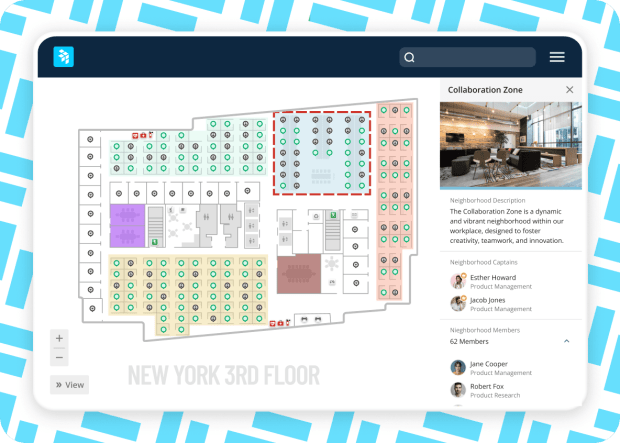
Create neighborhoods on the floor plan to govern seating assignments by team, role, or activity for more productive days at the office.
Create project or team-based rules for desk booking by neighborhood, which automatically apply as team members change roles or departments—saving FMs hours by eliminating manual updates.
OfficeSpace powers workplace excellence for 2,000+ teams globally


Create flexible working arrangements
Maximize hybrid work seating capacities with flexible neighborhood settings for visitor desk booking, desk hoteling, and desk lending.
Use neighborhoods to increase sharing ratios with more members and fewer desks so you can grow-in-place and optimize real estate costs.
Search neighborhoods by department or activity (like focused work), then book a desk in your neighborhood of choice from the floor plan.
Optimize seating capacity
Define and change neighborhoods, assign people to them, see team members on the floor plan, and run reports by neighborhood (occupants, headcount, department, and more).
Designate “seating captains” for each neighborhood to update seating assignments, approve requests, or release bookable desks.
Track neighborhood capacity against usage to optimize allocations, sharing ratios, and capacity targets.
INTEGRATIONS
Integrated out of the box
OfficeSpace comes fully integrated with Microsoft, Google, Slack, and Zoom.
Simplify the tech stack and keep work moving.

TAKE A TOUR
See it in action
Take a self-guided tour to see how you can create office neighborhoods to orchestrate seating in seconds.

Desk booking
Unlock easy ways to find and reserve optimal seats, automatically free up vacant desks, and enable desk lending to maximize utilization.
Room booking
Reduce conference room conflicts with real-time availability and notifications.
Scenario planning
Create potential floor plans based on demand and capacity and share with stakeholders for collaboration and approval.
Insights hub
Access digestible reports and detailed metrics to accelerate decision-making and demonstrate impact.
CONTACT US
Ready to transform your office experience?
OfficeSpace helps companies save costs, sustain teams, and optimize spaces with fast implementation of an intuitive platform and 24/7 live support.
35 Day
Implementations
SOC-2
AICPA Certified
Book a demo

FAQ
Questions? We're here to help.
Browse neighborhood FAQs. Don't see what you're looking for? Contact us.
Office neighborhoods are designated zones within a larger office space that are tailored to specific teams or departments. This approach allows for customization of work areas to suit the unique needs of each group, fostering a sense of community and belonging for employees. By clustering teams that frequently collaborate near each other in work neighborhoods, communication and productivity are naturally increased.
Office neighborhoods can be made up of desks, meeting spaces, kitchen areas, flex seating zones, and more.
Office neighborhoods can be configured in many different ways to optimize space on the floor plan, including across cubicles and as open-plan layouts. Software like OfficeSpace enables teams to test out neighborhood scenarios and collect feedback from stakeholders prior to taking plans live.
Neighborhoods can be easily reconfigured to accommodate varying team sizes or visitors from other departments. In most workspace management platforms, an administrator determines the layout of the neighborhoods, which desks are assigned to employees, and which workstations are used for hoteling or hot desking.
Office neighborhoods allow organizations to scale up or down more fluidly as business needs change, thereby managing financial and operational risks associated with long-term fixed or traditional office layouts. The ability to reconfigure spaces quickly and with minimal disruption supports fast-paced, agile project cycles that are conducive to innovation and better workplace management.
Office neighborhoods create a sense of community and belonging and foster a more engaging work environment and stronger camaraderie which ultimately leads to increased employee satisfaction in the workplace. They can improve teamwork and help an organization reach its goals faster. The flexibility of office neighborhoods allows for the creation of varied types of workstations and spaces within the same office—quiet zones, collaborative spaces, and relaxation areas—catering to different work styles and preferences. Data from neighborhood utilization can also be used to inform future types of spaces and office designs based on employee demand for different kinds of workplace design. Ultimately, effective office neighborhoods help teams improve space utilization, increase employee retention, provide a sense of belonging, and test new office environments that have the power to improve company culture.
Workplace management solution for the built environment

Block & Stack Planning
Ditch manual processes, spreadsheets, and outdated software for intuitive drag-and-drop stack planning.
Moves, Adds & Changes
Take the stress out of managing office moves, adds, and seating changes with a user-friendly tool to coordinate large and small workplace moves.
Scenario Planning
Test scenarios, manage supply and demand, plan for growth and contraction, and maximize space utilization with data-driven models.

Workplace Intelligence
Optimize your spaces, reduce real estate costs, and evolve your hybrid policies with usage and attendance insights you can act on.
Get more from your space, and connect the people in it
With intuitive tools to plan spaces, coordinate in-office days, manage desks and rooms, and optimize real estate portfolios—all in one platform for modern work.