Out now: Shared assigned seating gives teams more space without adding seats
By Beckett Johnson• 3 mins read•January 11, 2026
Key takeaways
- Shared Assigned Seating, now available in OfficeSpace, lets you assign a small group of employees to the same desk, with each person using it on different days throughout the week.
- Shared assigned seating integrates with OfficeSpace presence data like badge and WiFi, allowing teams to see who’s in the office and where in real time.
- CBRE data shows zero organizations are targeting a 1:1 seating ratio today, highlighting the shift toward flexible seating models.
Hybrid work created a seating problem no one asked for
Most hybrid teams share the same unspoken truth: Everyone comes in two days a week, and still wants a full-time desk. It’s the great mystery of modern workplace math (2 ≠ 5, yet here we are).
That leaves workplace teams stuck choosing between:
1. Giving everyone a dedicated seat (so facilities teams can enjoy a beautiful, very expensive rows of empty desks) or…
2. Go full hoteling, and enjoy the daily parade of “I couldn’t find a desk, so I just worked from home instead.”
Neither option feels great, and neither reflects how people actually use the office anymore.
Hybrid work pushed most companies away from a true 1:1 seating ratio. On-the-fly desk booking gives employees flexibility and helps optimize space, but having to choose a desk every day adds unnecessary uncertainty and friction. It’s a balancing act: giving employees predictability without locking organizations into more space than they truly need.
That’s why OfficeSpace launched Shared Assigned Seating
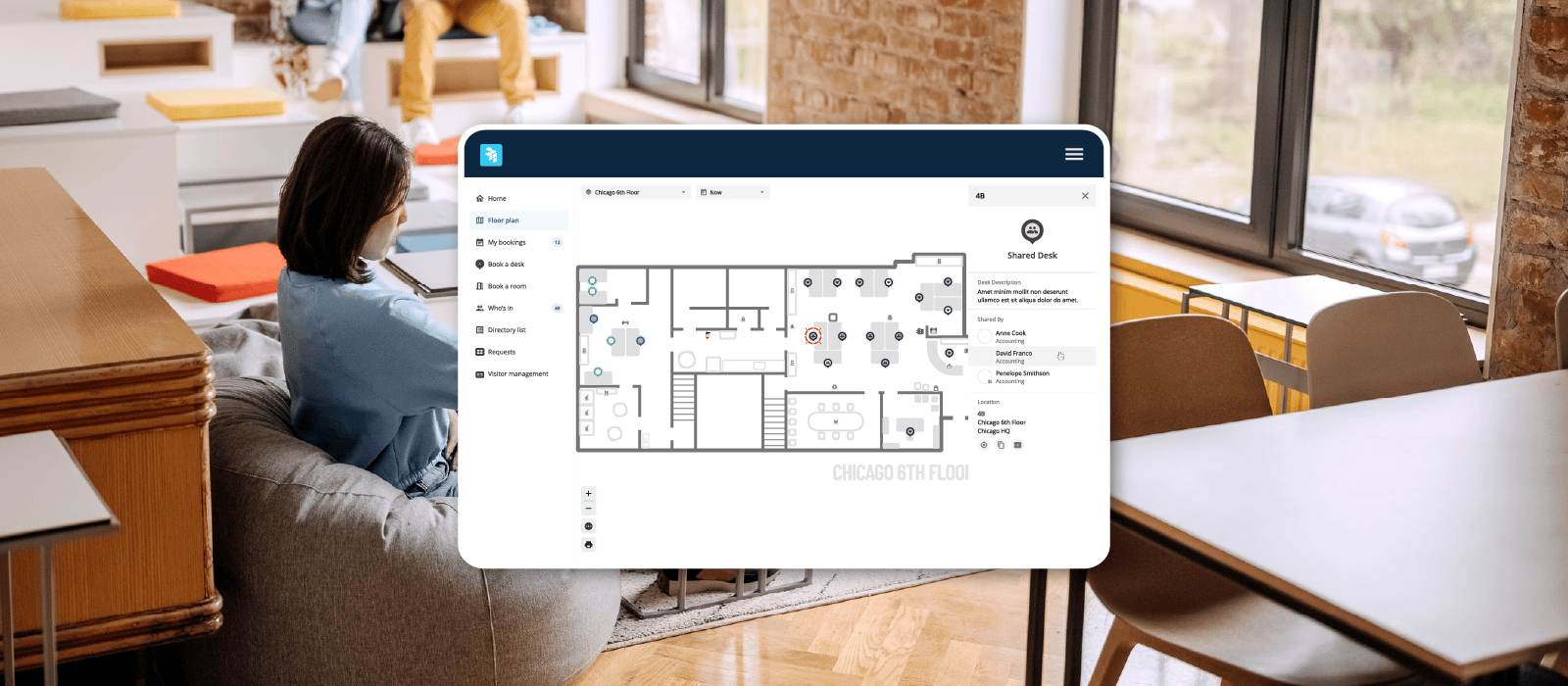
Shared Assigned Seating lets you assign a small group of employees to the same desk, with each person using it on different days throughout the week. Everyone gets a consistent home base, without needing multiple desks for a team that’s never in at the same time.
It’s a simple idea, but that’s sort of the point.
Whether you’ve got two employees who self-coordinate or a five-person team working different shifts throughout the week, everyone wins:
- Employees can just walk in and get to work. No desk booking, no searching, no uncertainty.
- Workplace teams get more capacity out of the space they already have, without adding desks, floors, or budget.
Integrating with WiFi, badge systems, or desk sensors, you always can see which assigned occupant is actively using the desk in real time.
Watch the demo
How to use Shared Assigned Seating
For facilities teams
- Convert any desk into a shared desk
- Assign up to five employees to that desk
- The shared desk appears on the floor plan with all occupants listed
- Presence indicators, including badge, Wi-Fi, or sensors, show who is currently in the office
- Seats can be vacated, occupied, or reassigned the same way as any standard assigned seat
For employees
- View the shared desk on the floor plan and see all assigned occupants
- Click any occupant to open their profile and view details
- See presence status directly in the seat tooltip and on the floor plan
- Search for a coworker to see if they are assigned to a shared seat, whether they are currently in the office, and where they are sitting
With Shared Assigned Seating, OfficeSpace now supports every seating model your workplace might need
Every workplace needs different seating strategies. They often change as teams grow, shift, and adopt new rhythms. With the addition of Shared Assigned Seating, we support everything seating model you might need:
| Category | Who Uses the Desk | Best For | How It Works | What it Solves |
| Assigned seating | One employee permanently assigned | Stable in-office teams or offices with ample space | Desk is manually assigned and fixed | Predictable and easy to track |
| Bookable or hoteling | Anyone can book the desk; no permanent owner | Hybrid teams reducing real estate costs | Employees book daily through Visual Directory, Slack, or Teams | Flexible and space-efficient |
| Desk lending | One assigned user; others book it when that person is away | Teams that want to maximize use of assigned seats | Desk owner or admin lends the desk for specific dates | Supports flexibility without losing ownership |
| Shared assigned seating (New) | Two to three employees share one desk and coordinate use, up to five supported | Hybrid organizations wanting to share seating without daily booking | Facility manager assigns multiple people to one desk; presence data shows who is in | Provides ownership while optimizing space |
How are businesses reducing real estate with seating?
Real estate teams are under pressure to reduce their footprint wherever possible. But adding more desks or more floors isn’t always the answer, especially when the office is underutilized most days of the week.
Instead, many organizations are turning to shared seating models that give them flexibility without forcing employees into constant hoteling.
The 2024-2025 Global Occupancy & Workplace Insights report from CBRE shows just how quickly this shift is happening:
- Hybrid and desk-sharing models tripled from 12% to 36%.
- 62% of organizations now target ≥1.5 employees per desk.
- Sharing ratios above 2:1 increased 93% year-over-year, showing how quickly companies are consolidating space.
Shared seating is here to stay, but companies still want predictability. Employees still want a “desk of their own,” and workplace teams need clarity about who is sitting where, and when.
See how it works, or schedule a call with your CSM to get started.

Get exclusive insights on workplace trends
Continue reading

Restacking the workplace for a workforce transformation