

What's new
Keep up with OfficeSpace’s latest product news and be the first to know when new releases and updates go live.
Request Manager and Assets integration
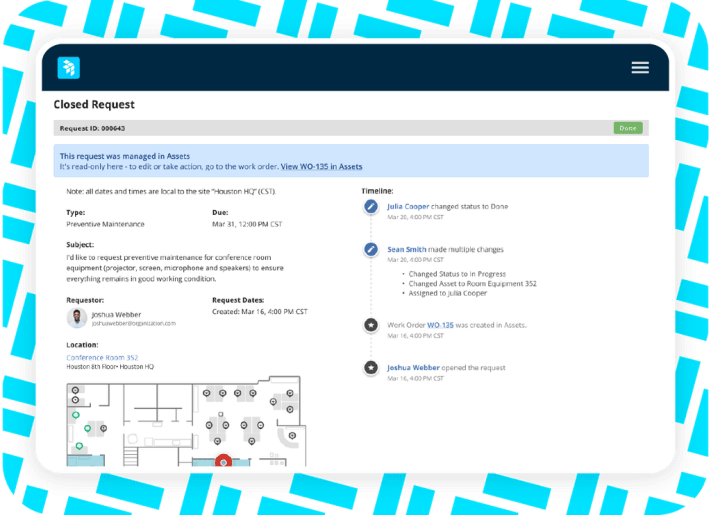
From request to resolution in one workflow
Facilities requests submitted in Workplaces now become work orders in Assets, with the location attached and the asset linked. Status flows back on its own, and the request closes itself when the job is done.
How it works
- Report it. An employee submits a request and drops a pin or uses their seat. They don’t need to know which unit is broken.
- Route it. The request goes straight to your maintenance team, or a request manager reviews it first. You choose, per request type.
- Fix it. The technician sees the location, links the right asset, and does the work.
- Close it. The request closes itself, the employee is notified, and the repair goes into the asset’s work order history.
AI desk and room booking

Find and book space with a simple request.
Our new OfficeSpace MCP simplifies key workplace operations and allows you to work in the tech stack that’s best for you. Make a natural-language request such as, “Find me a desk near Jordan on Wednesday,” in OfficeSpace or an approved AI assistant such as Claude, ChatGPT, or Copilot. OfficeSpace checks live availability, completes the booking, and confirms the space, floor, date, and time.
- Include the date, space type, and seating preferences in one prompt
- Book for one or more days at once
- Complete bookings in the AI tool you already use
Employees get a faster, more intuitive booking experience, while every reservation is captured in OfficeSpace for a clearer view of workplace demand.
Recurring requests
Automate routine requests
Put recurring workplace requests on autopilot
OfficeSpace automatically creates recurring tickets and adds them to your existing queue, so routine work no longer depends on spreadsheets, calendar reminders, or someone’s memory.
- Schedule requests to repeat on any cadence: daily, weekly, monthly, or annually
- Keep existing assignment and SLA rules in place
- Track the status and history of every occurrence
- Pause recurring schedules without deleting the setup
Routine work stays on track with fewer manual steps, reminders, or follow-ups.
Space planning block view
Review your plan at a glance or seat by seat
See seat and people counts for every block in AI Canvas
Block View groups seats into labeled blocks and displays the seat and people counts for each one. Planners can quickly review allocations and available capacity, then switch to Seat View when they want to see individual seats.
- See seat and people counts by block
- Review allocations across floors
- Identify available capacity
- Toggle between Block View and Seat View
Understand how space is allocated at a glance.